Tuesday, March 20, 2012

Walmart offers in-store disc to digital UltraViolet conversion

Rip your DVDs to digital format and host them in the cloud! clip_image002

Walmart just held a press event that included almost every big studio executive and announced an exclusive in-store disc to digital conversion service. The service will be available in more than 3,500 stores starting April 16th. Customers can bring in their DVDs or Blu-Ray discs in and have them converted to digital format and hosted in the cloud via online movie streaming provider Vudu.

Ripping a single DVD will cost $2 and for $5 the digital copy can be done in an upgraded HD format. This is a step closer to the movie industry’s vision of UltraViolet (UV) movies and the service will also allow people to purchase movies and play them on any UV capable device. Head on over to Engadget to check out the full press release.

Source: Engadget

Turntable.fm going major!

imageTurntable.fm inks deals with major music labels, promises 'no traditional advertising'

You might not know about Turntable.fm yet. With all the other music streaming services out there, it’s not hard to imagine why Turntable.fm isn’t quite the household name.

The basic idea is that users get together in a room and listen to music from other users “dj-ing” in the same room. Social networking meets chat room meets Pandora and it’s all free. They launched an iPhone app last September and is taking another step into the big leagues.

Billboard reports Turntable.fm has officially signed a licensing deal with four major music labels. Turntable co-founder says that they want to focus on improving the user experience and assures users they will not use “traditional advertising.” Surely the idea is to drive music purchases and subscription, right? Details are not clear yet, but you can head over to Engadget to read their full write-up.

Source: Engadget

Tuesday, January 3, 2012

iTunes Match

I got myself signed up for iTunes Match this weekend. The basic idea; store all your iTunes music in the cloud and have access to your entire library from virtually anywhere on your iPod Touch, iPhone, or iPad. All this for $29.99 a year! Upon signing up, the service scans your entire iTunes library – regardless of the source – and matches music to high-quality copies from the iTunes store. The songs that can’t be matched are then uploaded to iCloud and are limited to 25,000 songs. Bear in mind, if you have over 25,000 tracks in your library, the limit only applies to tracks that could not be matched.

One of the features that made it so desirable for me was the ability to replace low-quality copies of songs with high-quality copies offered by iTunes. I tried it with a few tracks already.

The easiest way to check for low quality copies:
1. Make a smart playlist and match Bit Rate is less than 256
2. Make the iCloud status is Matched
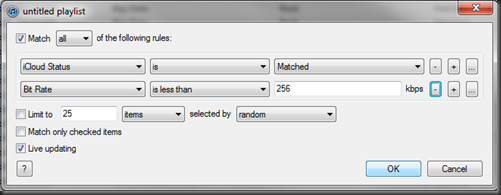
image

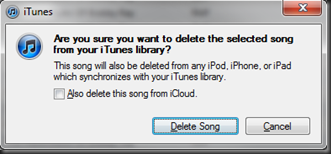
After making the playlist, I deleted a song, making sure not to check the box to "also delete from iCloud".
image

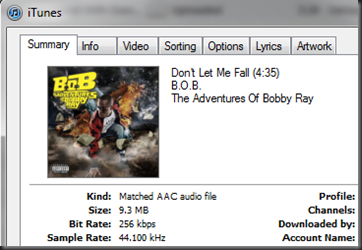
The song stays listed in iTunes, but has a cloud logo next to it where you can download it from iTunes in full 256 Kbps glory.

image

image

Problem is, I have a ton of albums for whatever reason or another matched only most of the album and left 3-8 tracks that had to be uploaded. In the example here, you can see tracks that didn’t match even though they’re from the same album:
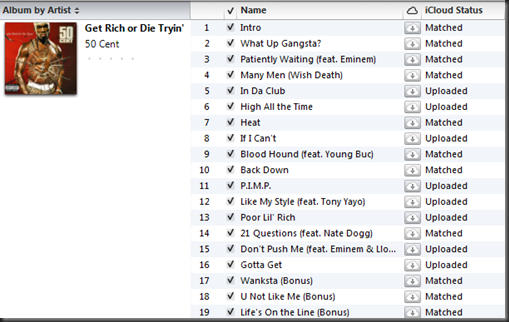
image

On those tracks that were uploaded, deleting it and re-downloading from iTunes just gives you the same quality MP3. Also, some songs are ineligible and will not match or upload because they were under 56 Kbps or something. With those, users can right-click and “convert to MP3” and they may then upload or match...well, the ones I tried did.

Another hitch I had. I activated iTunes Match on my iPod Touch before my PC was done being analyzing my library and uploading songs. As a result, when I turned on iTunes Match, the iPod thought I had nothing in my Match library so my iPod was stripped of about 22 gigs of local files. This left me with my entire library showing up on the iPod, but I had to download any songs I wanted. (You can also just select them to stream/listen to them and I think it downloads as well)

All the songs showed an iCloud logo next to them that could be tapped to download. You can also download all tracks from an artist, an entire album, and an entire playlist, it's pretty cool. At first I didn't think it would be a big deal that my iPod was wiped, I just made sure to download some essential playlists and albums I thought I would need. Grabbed about 5 gigs in maybe an hour or so.

Well...wouldn't you know it, as soon as I was out and about I wanted to listen to a song I hadn't downloaded to my iPod yet. With no Wifi I couldn't stream it or download it. Sucked, but wouldn't be a problem with an iPhone since there's no dependency on Wifi.

Next problem, Watch The Throne would not download completely. There were three tracks that just would not complete. No matter what I did, the same three tracks would download to about 90% and stay there. I disabled iTunes match, re-enabled it, no luck. Disabled iTunes Match, copied the files locally to my iPod, turned back on iTunes Match...same deal, those three tracks were removed and would not download from iTunes.

After a lot of troubleshooting on my own I was able to figure out a couple things. 1. the original digital files I had were “owned by” two different iTunes accounts, the three tracks that wouldn't download were from a different account than the rest. I just deleted the whole album from my PC and from iCloud, re-ripped the album, and re-matched with iTunes. Downloading worked fine then.

Moving on to my iPad, when I turned iTunes Match on my iPad I was expecting the same thing to happen (all music deleted). I actually wanted all the music deleted on my iPad. Low and behold - that didn't happen. I'm assuming that once I let iTunes complete the matching/uploading process it built my iCloud library. Turning on iTunes Match on the iPad at that point left all the local files intact because they were listed in my iCloud library, and only added the rest of songs in the cloud with options to download them.

Knowing my iCloud library was all good to go, I couldn't understand though why when I removed iTunes Match from my iPod, added 22 gigs of music, turned iTunes Match back on, it still deleted my local files, unlike what happened on my iPad. Even if I turned off iTunes Match, all my songs still had the cloud logo and allowed/forced me to download them in order to listen.

I looked in Settings > Store and tapped on my account to "View Account". There was an option to "delete this device from iCloud" so I picked it. After that, my songs still showed the cloud icon (??). I ended up wiping it completely and starting over from scratch. Added 22 gigs of music, turned on iTunes Match, and now my iPod is perfect. I set it up on my youngest son's iPod Touch and got the same successful results. It left his local files intact aand gave him access to the entire library.

Footnotes: If you want to keep the local music files on your device, do not activate iTunes Match on your device until the entire iTunes library has been analyzed and uploaded. Your library will be wiped out and replaced with an iTunes Match library specific to that device.

Wednesday, December 28, 2011

Is Android Really Open Source?

Recently VisionMobile published a report called The Open Governance Index. It looked at the relative openness of Android, Qt, Symbian, MeeGo, Mozilla, WebKit, Linux, and Exclipse.  The report suggests that Android’s success has less to do with open source licensing and more to do with Google’s financial power.

In an almost conclusive tone, the report states that Google’s size, a huge amount of marketing dollars from carriers and vendors, and the need to counter Apple are all more responsible for Android’s success than the actual OS or the open source licensing.

“Android would not have risen were it not for the billions of dollars that OEMs and network operators poured into Android in order to compete with Apple’s iconic devices,” the firm wrote. “As Stephen Elop, Nokia’s CEO, said in June, 2011, ‘Apple created the conditions necessary for Android.’ (bgr.com, 2011).

Here is a copy of the infographic from visionmobile.com. Be sure to head over to BGR.com to read the entire article by Zach Epstein on December 13th, 2011.

5 Principals of Innovation

Read an article on digitalonto.com from December 11th, 2011. It addresses the question: Are innovators born or made? Surely there is something a bit “different” about the super-innovative people in the world. Often I have found that creative and artistic people see things differently and are sometimes seen as strange or quirky. Whether or not innovation and creativity can be taught is still a question, but here are 5 principals of innovation that are present in almost all successful innovations.


1. Think Small
A small idea has potential to grow into something phenomenal. Thinking too big can lead to enormous and daunting goals and wishes that never come to fruition.
2. Disruptive innovations are crappy
Disruptive innovations strive to change an entire industry or create a new market. The problem is, they often take something and simply dumb it down. It targets consumers who are looking for products that are superior to existing products in some ways while eliminating some of the ‘extra’ functionality that they may not need. Sometimes these innovations take products and make them “good enough”.
3. Innovation is combination
Innovative products usually take flight when they are coupled with or take advantage other products or services. The Apple eco-system is a great example of products that started with iPods and now stretches out to iPhones, Apple TVs, iPads, and more; all linked via iTunes and the Apple AppStore.
4. Passion and perseverance are key
People who introduce successful innovations have to be passionate about their ideas. To take something that is completely new and attempt to introduce it to people as something they need requires an amount of love and confidence in the idea. The fact that many other people will say it will never work or will deny the opportunity means that perseverance is crucial too. Without the will to persevere in implementing the idea a person is passionate about, innovation cannot survive.
5. The 70/20/10 portfolio
Simply stated:
-Put 70% of innovation efforts toward taking the competition’s money
-Put 20% of innovation efforts toward taking somebody else’s money (a customer or supplier)
-Put 10% of you innovation efforts toward creating something new and cool
Be sure to stop at Digitaltonto.com to read the entire article: 5 Principals of Innovation

Wednesday, December 21, 2011

Is the iPad the Most Hated Gadget Ever?

Mike Elgan from cultofmac.com seems to think so. In an interesting article on the cultofmac website he gives his reasoning for this suggestion.

Tablet makers hate the iPad because they can’t compete with the numbers unless they sell tablets for prices so cheap it comes as a loss. Other tablet markets like those found in aviation and medical industries hate the iPad because it costs a fraction of what their devices do and works far better. The toy industry hates the iPad because all the kids want one. And finally, the PC industry hates the iPad because more people are realizing that they don’t need a PC as much as they used to.

Elgan brings up some good points and even shares my feelings towards Amazon and their soon-to-be reasons for hating the iPad as well. With growing rumors of a 7.85-inch iPad replacing the iPod Touch, things don’t look so good for the Kindle Fire. About the only appealing thing about that device is the obvious low price point.

Head on over to check out the full article:
Mike Elgan - Why the iPad Is the Most Hated Gadget Ever

Hi Tech Lighting Display

This is a state-of-the-art showcase of 3D projection mapping and creativity. The show took place on August 24th, 2010 in Kharkov, Ukraine on the Kharkiv Regional Administration’s building to honor the city’s birthday and Independence day.

Source